All examples
Picking
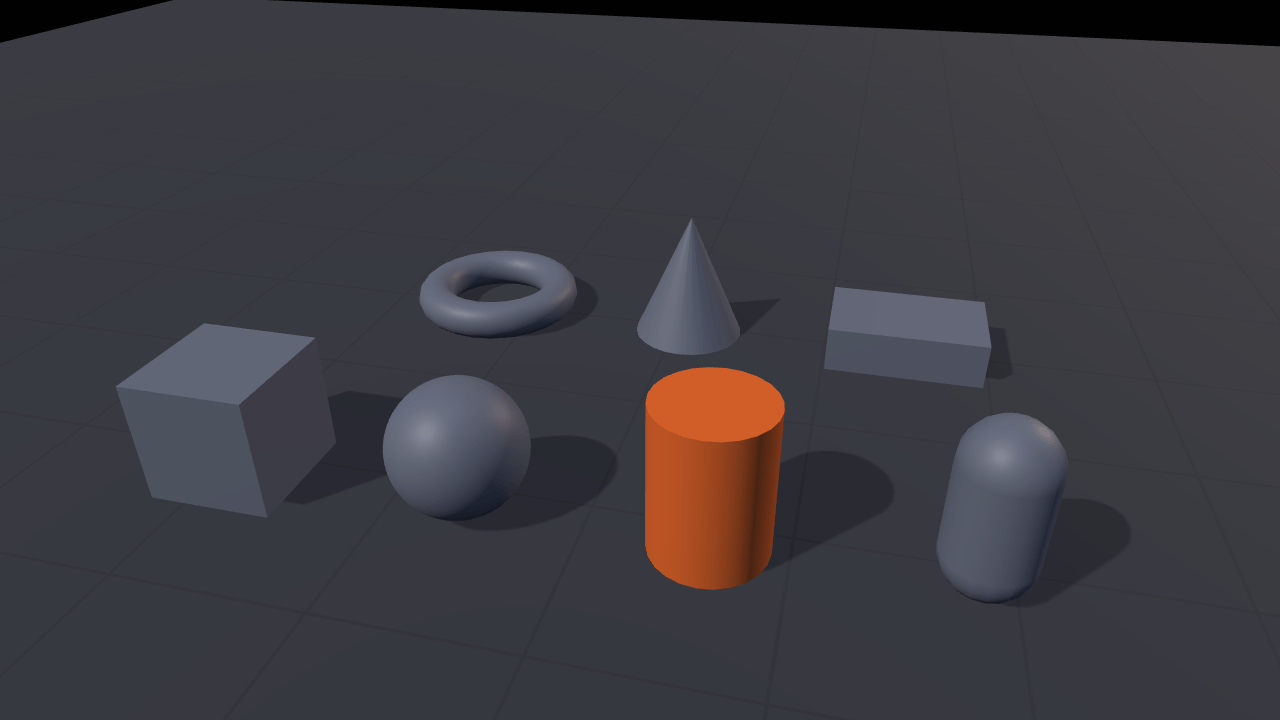
Select shapes on a grid using two methods: GPU picking and CPU raycasting. The panel shows which object each method finds and how long it takes. Toggle whether the floor can be selected, then try again.
Off airLivePaused
Picking
Rendering · 3D
WebGPU: checking…See browser support
Try this
- Click a shape, then the floor between two of them: both paths report the same hit and the same miss.
- Read the two timings. The CPU row is the ray test alone; the GPU row includes the readback.
- Turn on “Ground is pickable” and click the grid — one flag, and both paths start finding it.
Show source code
Source
import { Camera, createRay, defineInputActions, MeshRenderer, Vec3 } from "ignifx";import { bootExample } from "../_kit/boot.ts";import { attachOrbit } from "../_kit/orbit.ts";import { button, readout, toggle } from "../_kit/panel.ts";import { createGridGround, createLightRig } from "../_kit/stage.ts";import { ClickToPick, PICK_ACTIONS } from "./click-to-pick.ts";import { CLEAR_COLOR, createPickableScene, SHOT } from "./scene.ts";import type { Picker } from "./click-to-pick.ts";import type { RenderPick, Vec3Like } from "ignifx";/** * Two ways to ask "what is under this pixel?", run on the same pixel so you can compare them. * * `app.renderer.pickAsync` asks the GPU: it renders object ids and reads one back, so its answer * arrives a frame or more later and its time includes that wait. `app.world.raycastRender` asks the * CPU: `Camera.screenToRay` turns the pixel into a ray and the ray is tested against each mesh's * triangles, which needs the mesh's positions kept in memory. Both skip a mesh whose `pickable` is * false, so hiding a mesh is not enough to make it unpickable. Pointer positions from * `@ignifx/input` are already in the backing-store pixels both calls take. *//** What one resolved pick is remembered as, for the readouts. */interface PickResult { /** What was hit, or a dash for a miss. */ readonly label: string; /** How long the call took, in milliseconds; `0` before either path has answered. */ readonly ms: number;}/** Neither path has answered yet. */const UNPICKED: PickResult = { label: "click a shape", ms: 0 };/** * Writes one result as `Sphere · 0.42 ms`. * * @param result - The result to write. * @returns The text for a readout cell. */function describe(result: PickResult): string { return result.ms === 0 ? result.label : `${result.label} · ${result.ms.toFixed(2)} ms`;}/** * Names what a pick found. * * @param hit - The pick, or `null` for a miss. * @returns The entity's name, or a dash. */function nameOf(hit: RenderPick | null): string { return hit === null ? "— nothing" : hit.entity.name;}bootExample({ title: "Picking", settings: { rendering: { clearColor: CLEAR_COLOR, features: { shadows: true } }, }, async setup({ app, panel, afterStart }) { app.registerComponents([ClickToPick]); // `loadActions` merges by map name, so the orbit camera's own map is untouched. app.input.loadActions(defineInputActions(PICK_ACTIONS)); const eye = app.world.createEntity("Main Camera"); const camera = eye.addComponent(Camera, { near: 0.1, far: 200, fov: SHOT.fov }); attachOrbit(app, eye, { yaw: SHOT.yaw, pitch: SHOT.pitch, distance: SHOT.distance, target: SHOT.target, minDistance: 2, maxDistance: 14, }); createLightRig(app, { focus: SHOT.target, shadows: true, shadowDarkness: 0.25 }); // Darker than the kit's default so a grey shape reads against it, and so the one orange shape // is the only thing in the frame the eye goes to. const ground = await createGridGround(app, { fade: true, color: { r: 0.17, g: 0.19, b: 0.23, a: 1 } }); const scene = createPickableScene(app); let cpu = UNPICKED; let gpu = UNPICKED; let agree = "—"; // Each pick and each Clear takes the next number. A GPU answer that comes back after a newer // pick, or after Clear, is stale and is dropped rather than written over the readouts. let latest = 0; // One ray, reused: `screenToRay` writes into what it is given, so a pick allocates nothing // (coding standards §7). const ray = createRay(); const picker: Picker = { pickAt(x: number, y: number): void { latest += 1; const id = latest; // The CPU path first, because it is synchronous and it is what sets the highlight — so a // capture is the same frame whatever the device does with the GPU pick. const cpuStart = performance.now(); const filled = camera.screenToRay(x, y, ray); const cpuHit = filled === null ? null : app.world.raycastRender(filled); cpu = { label: nameOf(cpuHit), ms: performance.now() - cpuStart }; scene.highlight(cpuHit?.entity ?? null); const gpuStart = performance.now(); gpu = { label: "waiting for the device", ms: 0 }; agree = "waiting for the device"; void app.renderer .pickAsync(x, y) .then((gpuHit: RenderPick | null): void => { if (id !== latest) { return; } gpu = { label: nameOf(gpuHit), ms: performance.now() - gpuStart }; agree = gpuHit?.entity === cpuHit?.entity ? "yes" : "no — read the two rows above"; }) .catch((error: unknown): void => { if (id !== latest) { return; } gpu = { label: "the pick failed", ms: 0 }; agree = "unknown"; app.log.warn("pickAsync:", error); }); }, }; app.world.createEntity("Pointer").addComponent(ClickToPick).picker = picker; // `worldToScreen` is `screenToRay`'s inverse and answers in the same backing-store pixels the // pick calls take, so projecting a point and picking that pixel picks whatever is there. const projected = new Vec3(); const pickPoint = (point: Vec3Like): void => { if (camera.worldToScreen(point, projected)) { picker.pickAt(projected.x, projected.y); } }; // The cylinder's centre, projected and picked: what the button below and the opening frame // both do, and a pick that needs no pointer on a touch screen or a gamepad. const pickOpening = (): void => { if (scene.opening !== null) { pickPoint(scene.opening.transform.position); } }; // One pick before the first frame is called settled, so the example opens on an answer rather // than on an instruction — and so a `?static=1` capture shows the highlight. afterStart(pickOpening); panel({ title: "Picking", groups: [ { label: "The same pixel, twice", controls: [ readout("GPU pickAsync", (): string => describe(gpu)), readout("CPU raycastRender", (): string => describe(cpu)), readout("Same entity", (): string => agree), // A shape, not the point the camera orbits: that is the empty floor between the two // rows, which neither path finds until the ground is pickable. button("Pick the cylinder", pickOpening), button("Clear", (): void => { latest += 1; scene.highlight(null); cpu = UNPICKED; gpu = UNPICKED; agree = "—"; }), ], }, { label: "Scene", controls: [ // `pickable` is what both paths skip, which is what makes "pick only the pickups" a // property of the mesh rather than a filter written at every call site. toggle("Ground is pickable", { value: false, change: (on: boolean): void => { const renderer = ground.entity.getComponent(MeshRenderer); if (renderer !== null) { renderer.pickable = on; } }, }), readout("Pickable shapes", (): string => String(scene.count)), ], }, { label: "Frame", collapsed: true, controls: [readout("Draw calls", (): string => String(app.renderer.drawCalls))], }, ], }); },});/** * The scene `picking` picks in: the seven shapes, their two materials, and the material swap that * shows which one was hit. * * @remarks * A separate file for the reason `pbr-model/shot.ts` is: none of it is a lesson about picking. * `main.ts` is then the two pick calls, the click that triggers them and the readouts that compare * them, which is all a reader came for. * * Every mesh is built in code, so the example fetches nothing and the whole scene is reproducible * from the numbers below. Two rows rather than one, and seven shapes rather than three, because * the comparison only means something when a click can miss: the gaps are where both paths answer * `null`, and the torus has a hole a bounding box would fill and neither of these paths does. */import { createMaterialAsset, MeshAsset, MeshRenderer, pbrMaterialDefinition } from "ignifx";import type { App, AssetHandle, ColorLike, Entity } from "ignifx";/** Where one shape stands, and which mesh it is. */interface Shape { /** The entity's name, which is what the readouts show when it is hit. */ readonly name: string; /** Metres along X from the scene's centre. */ readonly x: number; /** How high the origin sits so the shape rests on the ground, in metres. */ readonly y: number; /** Metres along Z; negative is towards the camera at a yaw of zero. */ readonly z: number; /** * Builds the mesh. * * @param app - The app the mesh belongs to. * @returns The handle, with one holder — the renderer that is about to take it. */ readonly mesh: (app: App) => AssetHandle<MeshAsset>;}/** The colour a shape is drawn in until it is picked. */const IDLE_COLOR: ColorLike = { r: 0.42, g: 0.45, b: 0.52, a: 1 };/** The colour the picked shape is drawn in: the site's ember, so a hit is unmistakable. */const PICKED_COLOR: ColorLike = { r: 0.93, g: 0.42, b: 0.16, a: 1 };/** The near-black the frame is cleared to, matching the site's dark background. */export const CLEAR_COLOR: ColorLike = { r: 0.043, g: 0.059, b: 0.094, a: 1 };/** The opening shot: high enough to see both rows and the gaps between them. */export const SHOT = { fov: 42, yaw: 14, pitch: 30, distance: 6.2, target: { x: 0, y: 0.28, z: 0 } } as const;/** The scene, in the order it is built. */const SHAPES: readonly Shape[] = [ { name: "Box", x: -1.85, y: 0.33, z: -1.15, mesh: (app: App) => MeshAsset.box(app, { size: 0.66 }) }, { name: "Sphere", x: -0.62, y: 0.35, z: -1.15, mesh: (app: App) => MeshAsset.sphere(app, { diameter: 0.7 }) }, { name: "Cylinder", x: 0.62, y: 0.4, z: -1.15, mesh: (app: App) => MeshAsset.cylinder(app, { height: 0.8, diameter: 0.6, tessellation: 24 }), }, { name: "Capsule", x: 1.85, y: 0.45, z: -1.15, mesh: (app: App) => MeshAsset.capsule(app, { height: 0.9, radius: 0.22, tessellation: 16 }), }, { name: "Torus", x: -1.25, y: 0.12, z: 0.95, mesh: (app: App) => MeshAsset.torus(app, { diameter: 0.85, thickness: 0.24, tessellation: 24 }), }, { name: "Cone", // A cone is a cylinder with one end closed to a point; ignifx has no separate factory. x: 0.1, y: 0.4, z: 0.95, mesh: (app: App) => MeshAsset.cylinder(app, { height: 0.8, diameterTop: 0, diameterBottom: 0.7 }), }, { name: "Slab", x: 1.5, y: 0.14, z: 0.95, mesh: (app: App) => MeshAsset.box(app, { width: 0.95, height: 0.28, depth: 0.62 }), },];/** The built shapes, and the two things `main.ts` needs from them. */export interface PickableScene { /** How many shapes there are, for the panel's readout. */ readonly count: number; /** The shape the example opens picked, so a capture shows an answer; `null` if it is missing. */ readonly opening: Entity | null; /** * Draws one shape as the picked one and the rest as they were. * * @param entity - What a pick found, or `null` to clear the highlight. */ readonly highlight: (entity: Entity | null) => void;}/** * Builds the shapes and the highlight. * * @remarks * The highlight is a material swap and nothing else. `MeshRenderer.materials` is a plain array of * handles, assigning it is the whole change, and it is on screen the next frame — no second pass, * no outline shader, no per-entity state to keep in step. * * @param app - The app the entities and the assets belong to. * @returns The scene's count and its highlight function. * * @example * ```ts * const scene = createPickableScene(app); * scene.highlight(hit?.entity ?? null); * ``` */export function createPickableScene(app: App): PickableScene { const idle = createMaterialAsset( app, pbrMaterialDefinition({ name: "picking/idle", baseColor: IDLE_COLOR, metallic: 0.1, roughness: 0.55 }), [], ); const hot = createMaterialAsset( app, pbrMaterialDefinition({ name: "picking/picked", baseColor: PICKED_COLOR, metallic: 0.1, roughness: 0.35 }), [], ); const renderers = new Map<Entity, MeshRenderer>(); for (const shape of SHAPES) { const entity = app.world.createEntity(shape.name); entity.transform.localPosition.set(shape.x, shape.y, shape.z); renderers.set( entity, entity.addComponent(MeshRenderer, { mesh: shape.mesh(app), materials: [idle], castShadows: true }), ); } let selected: Entity | null = null; // The cylinder: middle of the front row, and the tallest thing near the frame's centre. const opening = [...renderers.keys()].find((entity: Entity): boolean => entity.name === "Cylinder"); return { count: renderers.size, opening: opening ?? null, highlight(entity: Entity | null): void { const previous = selected === null ? undefined : renderers.get(selected); if (previous !== undefined) { previous.materials = [idle]; } selected = entity; const next = entity === null ? undefined : renderers.get(entity); if (next !== undefined) { next.materials = [hot]; } }, };}/** * The click: an action map, and the `Script` that turns a press-and-release on the canvas into one * pick. * * @remarks * A script on `@ignifx/input` actions rather than a DOM listener, because that is what a game * writes: the same class works with a mouse, with a finger and with a gamepad-driven cursor, and * `<Pointer>/position` already reports **backing-store pixels**, which is the space both pick * calls take. A DOM `pointerup` would have to be multiplied by the device pixel ratio first. * * Two details are what make it feel right rather than nearly right. `app.input.uiHasPointer` is * checked on the press, so a drag that starts on the parameter panel never picks. And the press * position is remembered, so the orbit camera's own gesture — a drag across the canvas — is not * read as a click on whatever happens to be under the release. */import { Script } from "ignifx";import type { InputAction, InputActionsInput, ScriptCallbacks } from "ignifx";/** The action map this example loads. Its own map, so the orbit camera's is untouched. */export const PICK_ACTION_MAP = "Picking";/** How far the pointer may travel between press and release and still count as a click, in pixels. */export const CLICK_SLOP_PIXELS = 6;/** The two actions the click needs, as a document `app.input.loadActions` takes. */export const PICK_ACTIONS: InputActionsInput = { maps: [ { name: PICK_ACTION_MAP, actions: [ { name: "pickPress", type: "button", bindings: [{ path: "<Pointer>/press" }] }, { name: "pickPosition", type: "vector2", bindings: [{ path: "<Pointer>/position" }] }, ], }, ],};/** Runs both picks at one pixel. `main.ts` implements it; the script only calls it. */export interface Picker { /** * Picks the pixel twice and updates the readouts and the highlight. * * @param x - The backing-store pixel x, from the canvas's left edge. * @param y - The backing-store pixel y, from the canvas's top edge. */ pickAt(x: number, y: number): void;}/** * Picks on a click that did not drag. * * @example * ```ts * app.registerComponents([ClickToPick]); * app.world.createEntity("Pointer").addComponent(ClickToPick).picker = picker; * ``` */export class ClickToPick extends Script implements ScriptCallbacks { /** The namespaced registration id. */ static typeId = "picking/ClickToPick"; /** * What a click is handed to. Assigned in code rather than declared as a schema field, because a * picker is a closure over the scene and not something a scene file could carry. */ picker: Picker | null = null; /** Where the pointer went down, in backing-store pixels. */ #pressX = 0; /** Where the pointer went down, in backing-store pixels. */ #pressY = 0; /** Whether the press in flight started on the canvas rather than on the parameter panel. */ #onCanvas = false; /** The press action, resolved once in `start` rather than looked up by name every frame. */ #press: InputAction | null = null; /** The pointer-position action, resolved once in `start`. */ #at: InputAction | null = null; /** Resolves the two actions; `main.ts` loads their map before the app starts. */ start(): void { this.#press = this.app.input.actions.find("pickPress"); this.#at = this.app.input.actions.find("pickPosition"); } /** Reads the frame's pointer state and picks on a release that stayed put. */ update(): void { const press = this.#press; const at = this.#at; if (press === null || at === null) { return; } if (press.wasPressedThisFrame) { this.#pressX = at.vector.x; this.#pressY = at.vector.y; this.#onCanvas = !this.app.input.uiHasPointer; } if (!press.wasReleasedThisFrame || !this.#onCanvas) { return; } this.#onCanvas = false; if (Math.hypot(at.vector.x - this.#pressX, at.vector.y - this.#pressY) <= CLICK_SLOP_PIXELS) { this.picker?.pickAt(at.vector.x, at.vector.y); } }}