All examples
Physically based rendering
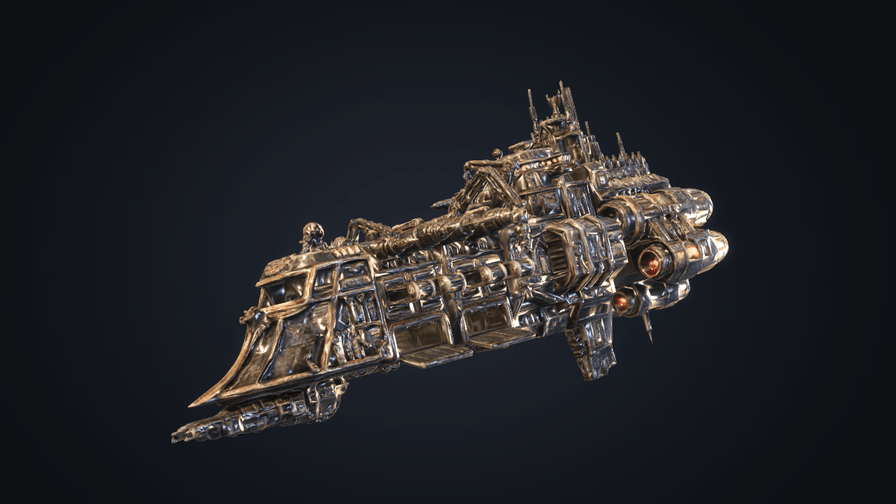
Explore a 3D ship rendered with physically based materials. Environment lighting creates reflections on the hull, while bloom gives the engines their glow. Adjust the lighting and materials in the panel, or switch models to compare the results.
This example is deliberately heavy: expect a lower frame rate on a phone or an older laptop.
Off airLivePaused
Physically based rendering
Rendering · 3D
WebGPU: checking…See browser support
Try this
- Drag to orbit and scroll to zoom. Watch the reflections change as you move.
- Choose Corset in the Model menu to compare a different model.
- Rotate the environment and watch every reflection on the hull move with it.
Show source code
Source
import { Camera, Environment, MODEL_ASSET_TYPE, Model, PostProcessStack } from "ignifx";import { bootExample } from "../_kit/boot.ts";import { twoPlaces } from "../_kit/format.ts";import { attachOrbit } from "../_kit/orbit.ts";import { bind, readout, select, slider, toggle } from "../_kit/panel.ts";import { createBackdrop, createStudioFloor, createStudioRig, loadEnvironment } from "../_kit/stage.ts";import { CURVES, degrees, framingPadding, GROUND, SHOT, START_CURVE, START_SUBJECT, SUBJECTS } from "./shot.ts";import type { Subject } from "./shot.ts";import type { AssetHandle, ModelAsset } from "ignifx";/** * The render path every 3D ignifx game uses: a glTF model with physically based materials, * image-based lighting from a prefiltered environment, and bloom over ACES tone mapping. * * The order of the steps is the lesson. Build the cheap parts; `load` every asset and **await it * before `app.start()`**, where a completed load settles at once rather than waiting for a frame's * `PreUpdate`; attach the components that need it; then `app.start()`, and only then switch the * effects on — a bloom task recorded before the scene is registered samples the swapchain, which * WebGPU rejects. `bootExample` owns that last bit of timing, through `afterStart`. * * The composition — which model, where it stands, the lens, the grading, the floor and backdrop * tones — is `shot.ts`, next to this file and shown beside it on the example's page. Splitting it * out is what keeps this file about the engine: every number in it was measured against a rendered * candidate, and none of it is a lesson about ignifx. */bootExample({ title: "Physically based rendering", settings: { rendering: { clearColor: GROUND.clear, // Both features are read once, when `app.start()` registers the scene; asking afterwards is // `IGX-0704`. `postProcessing` is the one people forget — it renders the scene into an // offscreen target so an effect has something it is allowed to sample. Without it a // `PostProcessStack` logs `IGX-0710` and does nothing at all. features: { shadows: true, postProcessing: true }, }, }, async setup({ app, canvas, panel, afterStart }) { const start = SUBJECTS[START_SUBJECT]; if (start === undefined) { return; } const focus = { x: 0, y: start.framing.aim, z: 0 }; const eye = app.world.createEntity("Main Camera"); eye.addComponent(Camera, { near: 0.02, far: 600, fov: SHOT.fov }); // Where the camera stands is each subject's own business, so `swap` below frames it. const orbit = attachOrbit(app, eye, { minDistance: 0.6, maxDistance: 4.5, idleDegreesPerSecond: SHOT.idle }); const rig = createStudioRig(app, { focus, keyIntensity: SHOT.key.intensity, keyPosition: SHOT.key.at, fillIntensity: SHOT.fill.intensity, fillPosition: SHOT.fill.at, fillColor: SHOT.fill.color, rimIntensity: SHOT.rim.intensity, rimPosition: SHOT.rim.at, }); rig.key.color = SHOT.key.color; rig.rim.color = SHOT.rim.color; const floor = createStudioFloor(app, { size: GROUND.floorSize, color: GROUND.floor }); // The two lamps that shape the subject are kept off the floor: their spill would pool behind it // and give the composition a second subject, and the backdrop is what the eye should find // there. `Light.exclude` is one assignment, matched on the entity, with no layer to set up. rig.rim.exclude = [floor.entity]; rig.fill.exclude = [floor.entity]; // The backdrop's pool of light is painted at the centre of its texture, and a sphere's `u` is // longitude — so turning the sphere is what puts the pool behind the subject instead of // wherever `u = 0` landed. The angle was found by sweeping it and looking, because which // meridian Lite's sphere calls `u = 0` is not something to depend on. const backdrop = await createBackdrop(app, { diameter: GROUND.backdropDiameter }); backdrop.entity.transform.localEulerAngles = { x: 0, y: SHOT.backdropYaw, z: 0 }; // Both loads are awaited before the loop runs, so neither needs a frame pumped to settle. The // `.env` also pulls the BRDF table Lite requires, from the `rendering.brdfLut` default address. const first: AssetHandle<ModelAsset> = app.assets.load(start.address, { type: MODEL_ASSET_TYPE }); const environment = loadEnvironment(app, "studio"); await Promise.all([first.promise, environment.promise]); // One `Environment` per world; a second logs `IGX-0705`. Its `imageProcessing` record is the // exposure/tone-mapping path the PBR shaders themselves compile, which is why changing the // curve recompiles a pipeline and changing the exposure is nearly free. There is no `blur` // here: it softens the visible skybox, and this environment is loaded without one. const sky = app.world.createEntity("Environment").addComponent(Environment, { environment }); sky.imageProcessing.toneMapping = CURVES[START_CURVE] ?? "aces"; sky.imageProcessing.exposure = SHOT.exposure; const entity = app.world.createEntity("Subject"); const subject = entity.addComponent(Model, { castShadows: true, receiveShadows: false }); const handles = new Map<string, AssetHandle<ModelAsset>>([[START_SUBJECT, first]]); let shown: Subject = start; let framedDistance = 0; /** * Points the camera at the subject and stands it back to the subject's framing, for the canvas's * current shape. `frame()` sets the distance at which the subject's sphere subtends the camera's * own field of view, times the padding. */ const frameShown = (): void => { const aspect = canvas.clientHeight > 0 ? canvas.clientWidth / canvas.clientHeight : 16 / 9; const focusAt = { x: 0, y: shown.framing.aim, z: 0 }; orbit.frame({ center: focusAt, radius: shown.framing.radius }, framingPadding(shown.framing, aspect)); framedDistance = orbit.distance; }; // Swapping a model is one assignment: `Model` compares the loaded asset with the one it // instantiated and rebuilds its subtree on the next sync. A handle asked for the first time is // still loading when it is assigned, so the new model appears on the frame its delivery lands // in — the asset lifetime, visible. const swap = (label: string): void => { const placement = SUBJECTS[label]; if (placement === undefined) { return; } const handle = handles.get(label) ?? app.assets.load<ModelAsset>(placement.address, { type: MODEL_ASSET_TYPE }); handles.set(label, handle); subject.model = handle; entity.transform.localPosition.set(0, placement.height, 0); entity.transform.localScale.set(placement.scale, placement.scale, placement.scale); entity.transform.localEulerAngles = placement.pose; // `active = false` hides, `destroy()` removes (`skills/ignifx/SKILL.md` gotcha 6): the floor // is switched, not rebuilt, so swapping back costs nothing. floor.entity.active = placement.floor; // A new subject is a new shot: the ship's framing crops a tall object standing on a floor. shown = placement; orbit.yaw = placement.framing.yaw; orbit.pitch = placement.framing.pitch; orbit.minPitch = placement.framing.minPitch; frameShown(); }; swap(START_SUBJECT); // A phone turned between portrait and landscape changes how much of the subject's width the // frame shows, so the shot is stood back again — unless the visitor has zoomed, in which case // the distance is theirs. new ResizeObserver((): void => { if (orbit.distance === framedDistance) { frameShown(); } }).observe(canvas); // The chain is built once and switched with `enabled`: a frame graph cannot have a task // removed. `afterStart` is when the effects go on; see the module comment. const post = eye.addComponent(PostProcessStack); post.bloom.threshold = SHOT.bloomThreshold; post.bloom.weight = SHOT.bloomWeight; post.bloom.kernel = SHOT.bloomKernel; post.smaa.threshold = 0.05; afterStart((): void => { post.bloom.enabled = true; post.smaa.enabled = true; }); panel({ title: "Physically based rendering", groups: [ { label: "Subject", controls: [select("Model", Object.keys(SUBJECTS), { value: START_SUBJECT, change: swap })], }, { label: "Grading", controls: [ slider( "Exposure", { min: 0.2, max: 3, step: 0.05, format: twoPlaces }, bind(sky.imageProcessing, "exposure"), ), // Not `bind`: the panel shows the industry's spellings and the field takes the engine's. select("Tone mapping", Object.keys(CURVES), { value: START_CURVE, change: (label: string): void => { sky.imageProcessing.toneMapping = CURVES[label] ?? "none"; }, }), ], }, { label: "Environment", controls: [ // Rotating the probe moves every reflection at once: the cheapest lighting control a // game can offer. slider("Rotation", { min: 0, max: 360, step: 1, format: degrees }, bind(sky, "rotation")), ], }, { label: "Post-processing", controls: [ // The component's `enabled` switches bloom and SMAA together: the chain stays recorded and // is skipped, a branch a frame rather than a rebuild per click. The threshold is live: the // recorded task's uniforms are re-uploaded the frame after it moves. toggle("Enabled", bind(post, "enabled")), slider( "Bloom threshold", // A step of 0.01 so the measured 0.35 is a stop on the track, not between two. { min: 0, max: 0.8, step: 0.01, format: twoPlaces }, bind(post.bloom, "threshold"), ), ], }, { label: "Frame", collapsed: true, controls: [ readout("Draw calls", (): string => String(app.renderer.drawCalls)), readout("Post-process tasks", (): string => String(post.taskCount)), ], }, ], }); },});/** * The composition: what `pbr-model` shows, where it stands, how it is graded, and what the frame is * cleared to. Everything a designer tunes, in one file, so `main.ts` is only about the engine. * * @remarks * Every number here was chosen against rendered candidates rather than guessed * (`plan/08-execution.md` §4.4), and several of them are measurements — the two subjects' * authored extents, the pose that puts the nose where the frame wants it, the lamp ratios, and the * bloom's cost in clipped pixels. The viewer page shows this file beside `main.ts`, which is the * point: it is the part a reader is most likely to want to change. Two numbers here are load * bearing outside it: `exposure` and `pitch`, which `_tools/make-backdrop-texture.ts` solves its * bytes and centres its pool of light for. */import type { ToneMappingCurve } from "ignifx";/** A rotation in degrees about each axis, as the engine's public API takes one. */export interface Euler { /** Pitch, in degrees. */ readonly x: number; /** Yaw, in degrees. */ readonly y: number; /** Roll, in degrees. */ readonly z: number;}/** One subject the Model select can show. */export interface Subject { /** The model's address, under the asset root the examples build points the plugin at. */ readonly address: string; /** The uniform scale the entity is drawn at. */ readonly scale: number; /** How high the entity's origin sits above the floor, in metres. */ readonly height: number; /** The pose the subject is placed in, in degrees. */ readonly pose: Euler; /** * Whether the studio floor is shown under this subject. The ship is key art — a ship in flight * has no floor, and any lit floor puts a horizon across a frame whose edges are meant to be * quiet — while the corset is a physical object that wants one to stand on. */ readonly floor: boolean; /** How the camera frames this subject, which `main.ts` applies every time the select picks it. */ readonly framing: Framing;}/** * How the camera frames one subject: where it orbits from, and how much of the frame the subject * fills. * * @remarks * Per subject, because the two have nothing in common: the ship is a long diagonal seen from below * on a long lens, the corset a tall, narrow object standing on a floor. The camera looks at the * point `aim` metres above the floor. */export interface Framing { /** How high the point the camera orbits is, in metres above the floor: the subject's middle. */ readonly aim: number; /** The radius of the sphere `orbit.frame()` fits, in metres. */ readonly radius: number; /** How much of that sphere the frame holds; below 1 crops into it. */ readonly padding: number; /** The yaw the camera opens on, in degrees. */ readonly yaw: number; /** The pitch the camera opens on, in degrees; negative looks up at the subject. */ readonly pitch: number; /** The lowest the visitor can orbit, in degrees. */ readonly minPitch: number; /** * The narrowest canvas, as width over height, whose width the subject was composed to fit. A * narrower canvas pulls the camera back until it shows the same width again; see * {@link framingPadding}. */ readonly composedAspect: number;}/** * The opening shot: the pose and the grading every capture is taken from — the viewer page opens on * it, the poster and the golden are it, and the first input moves away from all of it. * * @remarks * Key art, not a turntable. A long lens (26 degrees) flattens the perspective and lets the hull * fill the frame from further away; the camera sits *below* the ship's centre line and looks a * little upward (`pitch` is negative), which is what shows the profile and the belly rather than * the deck; `padding` crops into the bounding sphere, because a ship's silhouette is a long * diagonal and not a ball. `yaw`, `pitch` and `padding` are the ship's framing, which * {@link SUBJECTS} carries; the corset has its own. `idle` is zero: a still is a still — the * field is in `orbit.ts` for anything that wants a turntable. * * The lighting is three lamps, all directional, so their positions are only directions and no * intensity falls off with distance: a warm key from the front upper left, a cooler fill from the * opposite side so a panel line has two edges, and a warm-orange rim from behind and to the right, * which is what burns the wing edges and the engine housings out of the dark. The ratios are * measured rather than conventional. The fill is 0.42 of the key rather than the usual third, * because the subject is dark, worn metal and a third left its shadow side unreadable at the size * a poster is seen at; the rim is 1.5 times the key rather than the two to three a product shot * would use, because at 2.4 times — rendered, compared side by side — it flared the whole upper * silhouette into one line and took the panel work with it. * * **The lamps are bright and the exposure is low, and that is deliberate.** Exposure multiplies * everything in the frame, the unlit backdrop included, so raising it to brighten the ship raises * the backdrop with it and the frame stops being key art. Raising the lamps instead brightens only * what they touch, which is why the ship can be the brightest thing in the frame by a wide margin. * The low exposure has a second benefit worth knowing before changing it: it leaves * `_tools/make-backdrop-texture.ts` a wide range of bytes to paint the vignette's falloff with — * that file solves its bytes for this number and says so. * * The bloom is small on purpose, and how small was measured rather than judged: at the threshold * and weight below, 1,485 pixels of a 1280x720 frame reach 250 or brighter, against 797 with * `bloomWeight` at zero. So the effect is 700 pixels — the glints on the engine housings, the rim * along the wing edges, and nothing else. A threshold above about 0.6 does nothing at all, because * it is compared against the *linear* offscreen target rather than the graded frame. */export const SHOT = { fov: 26, yaw: 35, pitch: -8, padding: 0.6, idle: 0, exposure: 0.8, /** The backdrop sphere's own yaw, which is what puts its pool of light behind the subject. */ backdropYaw: 54, /** The warm key, from the front upper left. */ key: { intensity: 24, at: { x: -0.56, y: 1.6, z: -2.34 }, color: { r: 1, g: 0.851, b: 0.659, a: 1 } }, /** The cooler directional fill, opposite the key at 0.42 of its intensity. */ fill: { intensity: 10, at: { x: 2.44, y: 0.8, z: 0 }, color: { r: 0.68, g: 0.79, b: 1, a: 1 } }, /** The rim, behind the ship and to the right, at one and a half times the key. */ rim: { intensity: 36, at: { x: -0.12, y: 1.1, z: 2.6 }, color: { r: 1, g: 0.72, b: 0.44, a: 1 } }, bloomThreshold: 0.35, bloomWeight: 0.24, bloomKernel: 48,} as const;/** * The subjects, by the label the panel shows. The ship is the mascot and the default; the corset is * here because swapping a model at runtime is one assignment, and that is worth showing. * * @remarks * The two are authored at wildly different scales, which is the normal state of borrowed art: the * ship spans 0.488 x 0.504 x 0.980 metres and needs none, the Khronos Corset spans * 0.0390 x 0.0578 x 0.0390 and needs 16, and `_tools/compress-model.ts` prints both extents on * every run. `height` floats the ship clear of the floor, so it reads as a ship rather than as a * model on a shelf. The corset's origin is at the foot of its stand, so a `height` of zero stands * it on the floor, and the camera aims at its middle, 0.46 metres up. * * `pose` is the ship's attitude, and it is what makes a static mesh read as something in motion: * fourteen degrees of nose-down and eight of bank, with the hull turned fifteen degrees off the * camera's axis so the frame gets a front three-quarter — the nose out of the frame's lower left * and towards the viewer, the length of the hull running back up to the right, and the engines * highest. The ship's nose is its `-Z` end (measured: the cross-section tapers from 1,757 square * millimetres at `+Z` to 43 at `-Z`), and the pose is applied in Babylon's order, `Y * X * Z`, so * the three numbers were solved rather than swept: against this camera they put the nose 0.74 of a * unit to the left of the frame's centre, 0.15 down, and 0.65 towards the viewer — 49 degrees off * the camera's axis, which is what a three-quarter is — with the deck tipped 0.09 away, so the * frame gets a sliver of the belly. * * `framing` is per subject because the ship's crops the corset: a padding of 0.6 cuts into the * sphere on purpose for a long diagonal, and a tall object standing on a floor loses its top to it. * The corset is seen from a little above, so its floor is under it rather than a horizon behind it, * and the orbit keeps above that floor. The ship was composed in the site's 16:9 frame and is wider * than a square one, which `composedAspect` records; the corset is taller than it is wide and fits * any frame the orbit camera's portrait lens leaves it. */export const SUBJECTS: Readonly<Record<string, Subject>> = { Ship: { address: "models/ignifx-ship.glb", scale: 1, height: 0.7, pose: { x: -14, y: 15, z: 8 }, floor: false, // The shot looks up from just under the ship, so that is the lowest the orbit goes. framing: { aim: 0.7, radius: 0.62, padding: SHOT.padding, yaw: SHOT.yaw, pitch: SHOT.pitch, minPitch: SHOT.pitch, composedAspect: 16 / 9, }, }, Corset: { address: "models/corset.glb", scale: 16, height: 0, pose: { x: 0, y: 0, z: 0 }, floor: true, framing: { aim: 0.46, radius: 0.64, padding: 1.1, yaw: 35, pitch: 10, minPitch: 5, composedAspect: 1 }, },};/** The subject the example opens on, and the one every capture shows. */export const START_SUBJECT = "Ship";/** * The padding a subject is framed with on a canvas of a given shape. * * @remarks * `orbit.frame()` fits the sphere to the **vertical** field of view, so how much of a subject's * width shows depends on the canvas's shape. On a portrait canvas the orbit camera widens its lens * until the width is what a square frame would show (`_kit/orbit.ts`, "Portrait frames"), which * keeps the corset whole and still cuts both ends off a ship composed for 16:9. So below the aspect * a subject was composed at, the camera pulls back in proportion, and the subject spans as much of * the frame's width as it did in the frame it was composed in. Back rather than round, because the * three-quarter is the composition. * * @param framing - The subject's framing. * @param aspect - The canvas's width over its height. * @returns The padding to pass to `orbit.frame()`. */export function framingPadding(framing: Framing, aspect: number): number { // The orbit camera never shows less width than a square frame, so a portrait canvas counts as one. const shown = Math.max(1, aspect); return framing.padding * Math.max(1, framing.composedAspect / shown);}/** * The floor and the backdrop, in the site's own dark tones (`02-design-system.md` §2.3: `--bg` is * `#0D1015`), because the page wraps the frame in its ember glow. * * @remarks * `clear` is what shows where the backdrop sphere does not reach, and it is the same near-black the * backdrop's own edges are painted to render as. `floor` — the corset's floor, not the ship's — * is dark and bluish on purpose: the floor is lit, the probe's neutral bounce desaturates it, and * what it has to do is disappear into the backdrop's near-black edges while still catching the * subject's shadow. The backdrop itself is a soft pool of light behind the subject falling to * near-black at the frame's edges: the engine has no vignette pass, so the falloff is painted into * `textures/backdrop.png` — which solves its own bytes for the tones it has to *render* as — and * turned to face the camera by `main.ts`. */export const GROUND = { clear: { r: 0.008, g: 0.01, b: 0.016, a: 1 }, floor: { r: 0.004, g: 0.02, b: 0.075, a: 1 }, floorSize: 16, backdropDiameter: 20,} as const;/** * The tone-mapping curves, by the label the panel shows; the engine's own names are the lower-case * values (`TONE_MAPPING_NAMES`). ACES is what most engines call "filmic" and rolls a bright * highlight off instead of clipping it to white. */export const CURVES: Readonly<Record<string, ToneMappingCurve>> = { None: "none", Standard: "standard", ACES: "aces", Neutral: "neutral",};/** The label {@link CURVES} opens on. */export const START_CURVE = "ACES";/** * Writes a slider's value as an angle. * * @param value - Degrees. * @returns The text for the slider's value cell. */export function degrees(value: number): string { return `${String(value)}°`;}