All examples
First-person 3D game
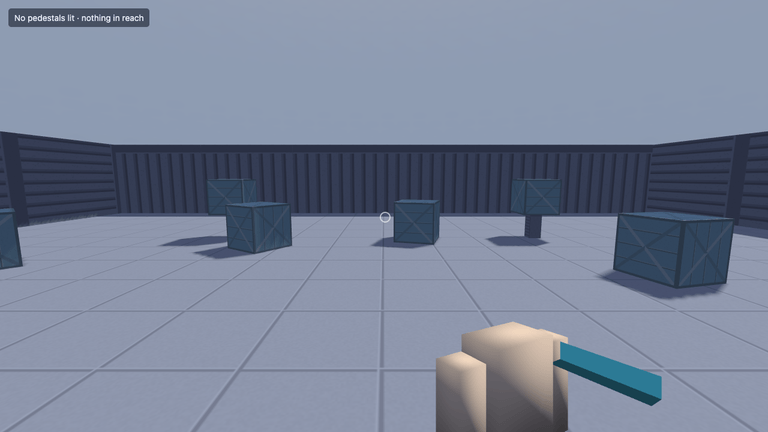
A playable starting point for a first-person game. Walk, sprint, crouch and jump around the room, then interact with pedestals to light them. The template includes mouse-look, a held item, menus, settings and saves.
Off airLivePaused
First-person 3D game
Templates · 3D
WebGPU: checking…See browser support
Try this
- Click the frame to take pointer lock, then walk with WASD and hold C to crouch.
- Look at a pedestal and press E, or click, to light it; the game autosaves when you do.
- Press Escape, then Settings, and turn shadows or post-processing off while the game runs.
Show source code
Source
// oxlint-disable no-underscore-dangle -- `window.__ignifxReady` is a test hook, and the double// underscore is what says it is not part of the game's API. The visual suite reads it by name.import { FirstPersonController } from "@ignifx/3d";import { AUDIO_ASSET_TYPE, AUDIO_BUSES_ASSET_TYPE, AudioSource } from "@ignifx/audio";import { createApp, isIgnifxError, Light, PostProcessStack } from "@ignifx/core";import { INPUT_ACTIONS_ASSET_TYPE } from "@ignifx/input";import { I18N_ASSET_TYPE } from "@ignifx/ui";// Vite virtual modules the plugins serve, typed by `@ignifx/vite-plugin/client` and// `@ignifx/editor-host/client`.import { attachEditorPlayControls } from "virtual:ignifx/editor";import { manifest } from "virtual:ignifx/manifest";import { acceptHotReload, scripts } from "virtual:ignifx/scripts";import { extensions } from "./extensions.js";import { installFrameTimeProbe } from "./frame-time-probe.js";import { createGameUi, hasTouch } from "./game-ui.js";import { installGameplayProbe } from "./gameplay-probe.js";import { createGameMenus } from "./menus/game-menus.js";import { applySettings, loadInputOverrides, loadSettings } from "./menus/settings-store.js";import { preparePedestals } from "./pedestals.js";import { createRun } from "./run.js";import { scriptType } from "./script-types.js";import type { GameMenus } from "./menus/game-menus.js";import type { GraphicsHooks } from "./menus/settings-store.js";import type { Interactable } from "./pedestals.js";// Types only: they are erased before the dev server sees this file, so no script module joins the// entry's graph and an edit to one hot-patches it instead of reloading the page (`script-types.ts`).import type { HudLine } from "./scripts/hud-line.js";import type { Interactor } from "./scripts/interactor.js";import type { LockHint } from "./scripts/lock-hint.js";import type { MenuController } from "./scripts/menu-controller.js";import type { SaveGame } from "./scripts/save-game.js";import type { AudioBusesAsset, AudioClip } from "@ignifx/audio";import type { App, AssetHandle, Entity } from "@ignifx/core";import type { InputActionsAsset } from "@ignifx/input";import type { LocaleAsset } from "@ignifx/ui";/** * A first-person 3D game: a walking, jumping, sprinting, crouching character whose head owns the * pitch, pointer lock on a click, a crosshair ray that lights the pedestal it lands on, a view * model with a prop attached to the rig's `hand` node, a loading screen and a pause menu. * * The level is data: `assets/scenes/main.scene.json` holds every entity, component and reference, * and this file loads it. The shape of this file is the shape of every ignifx game: * * 1. `createApp` with `extensions()` from `./extensions.ts`; `ignifx.config.ts` carries the settings. * 2. Register the scripts from `virtual:ignifx/scripts`, accept hot reloads, and hand the app to * the ignifx editor's play controls. * 3. Load what the scene's scripts read while it loads (input actions, audio buses), then the * scene itself. **Await it before `app.start()`**: a load awaited before the loop runs settles as * soon as it finishes; once the loop is running, delivery waits for a `PreUpdate`. * 4. The post-load steps a scene file cannot express — the README's "The level" lists them. * 5. `app.start()`. * * ## Query flags * * - `?static=1` loads the same scene, switches the controller and the crosshair ray off, turns the * character to face the pedestals by hand, and stops the clock before the first frame. No fixed * step ever runs, so nothing falls and no clip advances: the frame is exactly what was authored. * It is what the visual golden suite in `tests/visual/` opens. * - `?locale=fr` switches `app.i18n` before the menus are built. */declare global { interface Window { /** Resolves once the game has presented a settled frame. See the module comment. */ __ignifxReady: Promise<AppStatus>; }}/** What `window.__ignifxReady` resolves to. */type AppStatus = "ready" | "unsupported";/** The level, by its asset address. */const MAIN_SCENE = "scenes/main.scene.json";/** How many animation frames the scene is given before the image is called settled. */const SETTLE_FRAMES = 12;/** The body's yaw in `?static=1`, in degrees: turned to face the pair of pedestals at `z = -6`. */const STATIC_YAW = 180;/** The head's pitch in `?static=1`, in degrees; a little down, so the floor carries the frame. */const STATIC_PITCH = 7;/** The asset type to load each document as; see the same table in the third-person template. */const ACTIONS = { type: INPUT_ACTIONS_ASSET_TYPE } as const;const BUSES = { type: AUDIO_BUSES_ASSET_TYPE } as const;const CLIP = { type: AUDIO_ASSET_TYPE } as const;const STRINGS = { type: I18N_ASSET_TYPE } as const;/** The sounds, which stay out of the scene file: each one is optional (see `clipOrNull`). */interface Sounds { readonly pickup: AssetHandle<AudioClip>; readonly footstep: AssetHandle<AudioClip>; readonly jump: AssetHandle<AudioClip>; readonly land: AssetHandle<AudioClip>; readonly uiClick: AssetHandle<AudioClip>; readonly uiHover: AssetHandle<AudioClip>; readonly ambient: AssetHandle<AudioClip>;}function noop(): void { // Nothing to do: the promise executor runs synchronously and replaces this on the next line.}let announceReady: (status: AppStatus) => void = noop;window.__ignifxReady = new Promise<AppStatus>((resolve) => { announceReady = resolve;});function nextFrame(): Promise<void> { return new Promise<void>((resolve) => { requestAnimationFrame(() => { resolve(); }); });}/** * Waits for several animation frames, so a newly built scene has presented. * * @param frames - How many frames to wait for. * @returns A promise that resolves after the last of them. */function settle(frames: number): Promise<void> { let chain = Promise.resolve(); for (let index = 0; index < frames; index += 1) { chain = chain.then(nextFrame); } return chain;}/** * The clip behind a handle, or `null` when the browser refused to decode it. * * @remarks * `AssetHandle.value` is only meaningful once the handle is `"loaded"`; every sound in this * template is optional, so a failed decode costs the game that sound and nothing else. * * @param handle - The handle to read. * @returns The clip, or `null`. */function clipOrNull(handle: AssetHandle<AudioClip>): AudioClip | null { return handle.state === "loaded" ? handle.value : null;}/** Swaps the canvas for the "no WebGPU here" panel in `index.html`. */function showUnsupported(): void { document.body.dataset["webgpu"] = "unavailable";}/** The entities of the loaded scene that the code below wires up. */interface Level { /** The character's body, which carries the `CharacterController` and the controller. */ readonly player: Entity; /** The head, which carries the camera and the interaction ray. */ readonly head: Entity; /** The sun, so the settings screen can turn its shadows off. */ readonly sun: Light; /** The interactable pedestals, each with a material of its own. */ readonly pedestals: readonly Interactable[];}/** The DOM elements the front end writes to. */interface Overlay { /** The HUD line, or `null` under an app with no DOM overlay. */ readonly hud: HTMLDivElement | null; /** The crosshair, or `null` under an app with no DOM overlay. */ readonly crosshair: HTMLElement | null; /** The "click to look" line, or `null` on a device with no pointer to lock. */ readonly hint: HTMLElement | null;}/** * Finds an entity of the loaded scene by name. * * @param app - The running app. * @param name - The entity's name in `assets/scenes/main.scene.json`. * @returns The entity. * @throws Error when the scene has no entity of that name. */function requireEntity(app: App, name: string): Entity { const entity = app.world.findByName(name); if (entity === null) { throw new Error(`${MAIN_SCENE} has no entity named "${name}".`); } return entity;}/** * Finds the entities the code below wires up, and gives each pedestal its own material. * * @param app - The app the scene was loaded in. * @returns The character, its head, the sun and the pedestals. */function findLevel(app: App): Level { const sun = requireEntity(app, "Sun").getComponent(Light); if (sun === null) { throw new Error(`The Sun in ${MAIN_SCENE} has no Light.`); } return { player: requireEntity(app, "Player"), head: requireEntity(app, "Head"), sun, pedestals: preparePedestals(app), };}/** * Turns the loaded scene into the still frame the goldens are taken of. * * @remarks * Loading the scene has already run every `awake`, which reads but writes nothing. What would move * the picture is the controller's per-frame look and the crosshair ray, which also needs a physics * step behind it, so both are switched off. `AttachToHand` stays on: welding the prop to the * hand is part of the authored picture. The body and the head are then turned to face the pair of * pedestals at `z = -6` — yaw on the body and pitch on the head, the split the controller owns. * * @param app - The app the scene was loaded in. * @param level - The scene's entities. */function freezeForGolden(app: App, level: Level): void { // Stopping the clock *before* `start()` means no fixed step ever runs, so nothing falls and no // clip advances: the frame is exactly what was authored. app.time.timeScale = 0; level.player.requireComponent(FirstPersonController).enabled = false; level.head.requireComponent(scriptType<Interactor>(app, "first-person/Interactor")).enabled = false; level.player.transform.localEulerAngles = { x: 0, y: STATIC_YAW, z: 0 }; level.head.transform.localEulerAngles = { x: STATIC_PITCH, y: 0, z: 0 };}/** * Builds the front end and the save file over a level that is already loaded. * * @param app - The running app. * @param sounds - The sounds that decoded, and the ones that did not. * @param level - The scene's entities. * @param overlay - The HUD, crosshair and "click to look" elements, each `null` under an app with * no DOM overlay (and the hint also on a device with no pointer to lock). * @param isBench - Whether the frame-time harness is driving, in which case the game starts * immediately instead of waiting on a title screen. * @returns A promise for the callback that switches the post-process effects on; it has to run * after `app.start()` (see below). */async function installFrontEnd( app: App, sounds: Sounds, level: Level, overlay: Overlay, isBench: boolean,): Promise<() => void> { // The chain is built once and switched with `enabled`, because `rendering.features.postProcessing` // is read when `app.start()` registers the scene and asking for it later is `IGX-0704`. // The two effects are switched on by the callback this function returns, **after** `app.start()`. // Enabling them earlier makes Lite record the first bloom task against a source that is still the // swapchain, and the frame is rejected with `sourceTexture has no color texture`: the offscreen // target the presenter builds does not exist until the scene is registered. That ordering is // also why the stack is added here and not authored in the scene file. const post = level.head.addComponent(PostProcessStack); post.bloom.threshold = 0.8; post.bloom.weight = 0.4; const sun = level.sun; const graphics: GraphicsHooks = { supportsShadows: true, supportsPostProcessing: true, setShadows: (enabled: boolean): void => { // `rendering.features.shadows` stays on: it is what compiled the shadow pass. What a player // turns off is this light's own casting, which is a live flag. sun.shadows.enabled = enabled; }, setPostProcessing: (enabled: boolean): void => { post.enabled = enabled; }, }; // The ray itself — its eye and its reach — is in the scene; what it lights, the sound it plays and // the crosshair it updates are runtime objects a scene field cannot hold. const interactor = level.head.requireComponent(scriptType<Interactor>(app, "first-person/Interactor")); interactor.targets = level.pedestals; if (clipOrNull(sounds.pickup) !== null) { interactor.clip = sounds.pickup; } interactor.crosshair = overlay.crosshair; await loadInputOverrides(app); const settings = await loadSettings(app, app.i18n.locale); applySettings(app, settings, graphics); const host = app.world.createEntity("Game UI"); const saveGame = host.addComponent(scriptType<SaveGame>(app, "first-person/SaveGame")); let menus: GameMenus | null = null; // Where the run restarts: wherever the scene puts the character. const here = level.player.transform.position; const spawn = { x: here.x, y: here.y, z: here.z }; const run = createRun(level.player, interactor, level.pedestals, spawn, (): void => { if (saveGame.checkpoint()) { menus?.toast(app.i18n.t("toast.checkpoint")); } }); saveGame.run = run.state; menus = createGameMenus(app, { settings, graphics, gameplayMap: "Player", rebindable: [ { action: "Jump", labelKey: "action.jump" }, { action: "Sprint", labelKey: "action.sprint" }, { action: "Interact", labelKey: "action.interact" }, { action: "Pause", labelKey: "action.pause" }, ], creditKeys: ["credits.engine", "credits.art", "credits.license"], sounds: { click: clipOrNull(sounds.uiClick), hover: clipOrNull(sounds.uiHover) }, onStartNew: (): void => { saveGame.restart(); }, onContinue: (save): void => { saveGame.restore(save); }, onSaveNow: (): Promise<boolean> => saveGame.save(), onQuitToTitle: (): void => { saveGame.restart(); }, }); host.addComponent(scriptType<MenuController>(app, "first-person/MenuController")).menus = menus; const line = host.addComponent(scriptType<HudLine>(app, "first-person/HudLine")); line.element = overlay.hud; host.addComponent(scriptType<LockHint>(app, "first-person/LockHint")).element = overlay.hint; line.render = (): string => app.i18n.t("hud.status", { lit: interactor.litCount, target: interactor.focus === null ? app.i18n.t("hud.nothing") : app.i18n.t("hud.reach"), }); // The ambient pad loops on the `Music` bus, which `game.audio.json` marks as not pausable so the // menus can duck it rather than silence it. if (clipOrNull(sounds.ambient) !== null) { app.world.createEntity("Ambience").addComponent(AudioSource, { clip: sounds.ambient, bus: "Music", loop: true, playOnAwake: true, volume: 0.9, }); } if (!isBench) { // The game boots into its title screen. `MenuController` reconciles `app.pause()` against the // screen stack every frame, so this one call is what stops the world until "New game". The // frame-time harness measures a *running* game, so it skips this and nothing else. menus.show("title"); app.pause(); } return (): void => { post.bloom.enabled = true; post.smaa.enabled = true; post.enabled = settings.postProcessing; };}async function main(): Promise<AppStatus> { const canvas = document.querySelector("#game"); if (!(canvas instanceof HTMLCanvasElement)) { throw new Error('3d-first-person needs a <canvas id="game"> element on the page.'); } const flags = new URLSearchParams(window.location.search); const isStatic = flags.get("static") === "1"; const isBench = flags.get("bench") === "1"; const showOverlay = (!isStatic || flags.get("hud") === "1") && !isBench; let app: App; try { app = await createApp({ canvas, settings: import.meta.env.IGNIFX_CONFIG, // The address-to-URL table `@ignifx/vite-plugin` built from `assets/`. Importing the virtual // module rather than fetching `assets.manifest.json` means the table is in the bundle, so // the first asset request needs no round trip. assets: { manifest }, extensions: extensions(), }); } catch (error) { // IGX-0701 is the one failure a shipped game must handle itself: the browser has no WebGPU and // ignifx has no fallback renderer by decision (ADR-0001). if (isIgnifxError(error) && error.code === "IGX-0701") { showUnsupported(); return "unsupported"; } throw error; } // Every class under `src/scripts/**` with a `static typeId`, from the plugin's virtual registry. It // is the only way code reaches a script: the scene names them by `typeId`, and so does // `scriptType`. In development the registry hot-reloads edited scripts through `app.hotReload` // (`"patch"` by default). app.registerComponents(scripts); acceptHotReload(app); // Under `vite dev`, lets the ignifx editor's play view play, pause, step and stop this app. In a // production build it is an empty function (`vite.config.ts`). attachEditorPlayControls(app); // The strings come first and alone: every label below is read out of them, and the document is // under a kilobyte, so nothing is gained by making the loading screen wait for it. const strings = app.assets.load<LocaleAsset>("strings.i18n.json", STRINGS); await strings.promise; await app.i18n.load(strings); const locale = flags.get("locale"); if (locale !== null && app.i18n.availableLocales.includes(locale)) { app.i18n.locale = locale; } const gameUi = createGameUi(app, { loadingLabel: app.i18n.t("loading.label"), lockHint: app.i18n.t("hint.lock"), touch: !isStatic && !isBench && hasTouch(), touchLabels: { move: app.i18n.t("action.move"), look: app.i18n.t("action.look"), jump: app.i18n.t("action.jump"), interact: app.i18n.t("action.interact"), crouch: app.i18n.t("action.crouch"), pause: app.i18n.t("action.pause"), }, }); // The golden is about the rendered scene, not about how this machine draws a system font, and a // frame-time run should not be measuring DOM layout either. app.ui.visible = showOverlay; const sounds: Sounds = { pickup: app.assets.load<AudioClip>("pickup.wav", CLIP), footstep: app.assets.load<AudioClip>("footstep.wav", CLIP), jump: app.assets.load<AudioClip>("jump.wav", CLIP), land: app.assets.load<AudioClip>("land.wav", CLIP), uiClick: app.assets.load<AudioClip>("ui-click.wav", CLIP), uiHover: app.assets.load<AudioClip>("ui-hover.wav", CLIP), ambient: app.assets.load<AudioClip>("ambient.wav", CLIP), }; const actions = app.assets.load<InputActionsAsset>("game.input.json", ACTIONS); const buses = app.assets.load<AudioBusesAsset>("game.audio.json", BUSES); await Promise.all([actions.promise, buses.promise]); // The clips are awaited together and separately from the rest: a browser that refuses to decode // a sound should cost the game its audio, not its first frame. await Promise.all( Object.values(sounds).map(async (handle: AssetHandle<AudioClip>): Promise<void> => { await handle.promise.catch((error: unknown) => { app.log.warn("a sound could not be decoded: {error}", String(error)); }); }), ); // Installed here rather than through `input.actions` in `ignifx.config.ts`, so that the maps // exist before the scene loads: its controller and its crosshair ray resolve their action names // in `awake`, which runs while `loadScene` builds them. app.input.loadActions(actions.value); await app.audio.buildBuses(buses.value.buses); // Then the level itself: the loader fetches every mesh, model, material and animator the file // names before it builds an entity. await app.world.loadScene(MAIN_SCENE); const level = findLevel(app); let enableEffects: (() => void) | null = null; if (isStatic) { freezeForGolden(app, level); } else { enableEffects = await installFrontEnd( app, sounds, level, { hud: gameUi.hud, crosshair: gameUi.crosshair, hint: gameUi.hint }, isBench, ); } if (isStatic && showOverlay && gameUi.hud !== null) { // `?static=1` leaves the front end out, so nothing writes the HUD. `?hud=1` says the overlay is // wanted anyway — the gallery capture asks for exactly that — so the zero state is written once. gameUi.hud.textContent = app.i18n.t("hud.status", { lit: 0, target: app.i18n.t("hud.nothing") }); } gameUi.loading.hide(); // A test-only hook, and only under `?probe=1`: the gameplay half of // `tests/visual/tests/templates.spec.ts` reads the view and the character as numbers rather than // as pixels. See `src/gameplay-probe.ts`. if (flags.get("probe") === "1" && !isStatic) { installGameplayProbe(app, level.player, level.head, level.player.requireComponent(FirstPersonController)); } if (isBench) { installFrameTimeProbe(app); } await app.start(); // The post-process chain is switched on only now: its source is the offscreen target the // presenter builds while `start()` registers the scene, and a task recorded before that samples // the swapchain, which WebGPU rejects. enableEffects?.(); await settle(SETTLE_FRAMES); app.log.info("3d-first-person running; draw calls:", app.renderer.drawCalls); return "ready";}void main().then(announceReady, (error: unknown) => { showUnsupported(); announceReady("unsupported"); // Rethrown out of the promise chain so it reaches `window.onerror` as an uncaught error rather // than a swallowed rejection. Templates never log through `console` (coding standards §6). setTimeout(() => { throw error; }, 0);});import { MeshRenderer } from "@ignifx/core";import type { App, AssetHandle, Entity, MaterialAsset } from "@ignifx/core";/** * The interactable pedestals of the loaded scene, each given a material of its own. * * ## Why the clone is code * * Lighting a pedestal recolours its material with `setBaseColor`, which writes the Lite material * every renderer sharing the asset draws with. The scene file names the shared * `crate.material.json` on all three, because a scene file can only name a material by its asset * address and a runtime clone has none. Each pedestal therefore gets its own `clone` here, after * the load and before the first frame builds the renderer's mesh, so recolouring one does not * recolour them all. *//** One thing the crosshair ray can find. */export interface Interactable { /** The entity the ray hits. */ readonly entity: Entity; /** The pedestal's private material clone, so recolouring one does not recolour them all. */ readonly material: AssetHandle<MaterialAsset>; /** The emissive cap, shown only while the pedestal is lit. */ readonly glow: MeshRenderer;}/** * Finds every pedestal — every renderer on the `Interactable` layer, in scene order — and swaps its * shared material for a clone of its own. * * @param app - The app the scene was loaded in. * @returns The pedestals. * @throws Error when a pedestal has no material or no child renderer for its cap. */export function preparePedestals(app: App): Interactable[] { const layer = app.world.layers.requireIndex("Interactable"); const pedestals: Interactable[] = []; for (const renderer of app.world.components(MeshRenderer)) { const entity = renderer.entity; if (entity.layer !== layer) { continue; } const shared = renderer.materials[0]; const glow = entity.children.map((child) => child.getComponent(MeshRenderer)).find((found) => found !== null); if (shared === undefined || shared === null || glow === undefined) { throw new Error(`The pedestal "${entity.name}" needs a material and a child renderer for its cap.`); } const material = shared.value.clone(app); renderer.materials = [material]; pedestals.push({ entity, material, glow }); } return pedestals;}import { entityRef, f32, LayerMask, Script } from "@ignifx/core";import { DeviceKind } from "@ignifx/input";import type { AudioClip } from "@ignifx/audio";import type { AssetHandle, ColorLike, Entity, MaterialAsset, MeshRenderer, ScriptCallbacks } from "@ignifx/core";import type { InputAction } from "@ignifx/input";/** * The crosshair ray: what a first-person game does instead of clicking on things. * * ## Where the ray comes from * * The camera's own transform, not the character's. In first person the body owns the yaw and the * head owns the pitch (`FirstPersonController.cameraPivot`), so only the head is looking where the * crosshair points. `transform.forward` on the head entity is that direction, already in world * space, and the ray starts at the head's position because the crosshair sits at the exact centre * of the screen — the projection of the camera's own forward axis. * * A `camera.screenToRay(x, y)` would be the right tool for a cursor that can be anywhere; it takes * **backing-store** pixels, which is the space `@ignifx/input` reports pointer positions in. * * ## Why the mask is a layer and not a component check * * `app.physics.raycast` filters by layer inside Havok, so a ray aimed at the `Interactable` layer * never reports the floor, the walls or the crates and never allocates a hit for them. Walking the * hits and asking "is this a pedestal?" would do the same work in JavaScript, every frame, for * every ray. * * ## Why a click is ignored while the pointer is unlocked * * `Interact` is bound to both <kbd>E</kbd> and the left mouse button, and the left mouse button is * also the gesture that asks the browser for pointer lock (`FirstPersonController`'s * `lockPointerOnClick`). Without the gate below, the click that gives the player their mouse back — * after Escape, after a pause menu, after tabbing away — would *also* flip whatever pedestal * happened to be under the crosshair, which is a pedestal the player never aimed at. Left click * still interacts; it just has to be a click made while the game holds the pointer, which is every * click after the first. `InputAction.activeDevice` is what tells a mouse press apart from * <kbd>E</kbd>, a gamepad trigger or the on-screen button, none of which are gated. *//** How the pedestal reads when the crosshair is not on it. */const IDLE_COLOR: ColorLike = Object.freeze({ r: 1, g: 1, b: 1, a: 1 });/** How the pedestal reads once it has been switched on. */const LIT_COLOR: ColorLike = Object.freeze({ r: 0.29, g: 0.82, b: 0.94, a: 1 });/** One thing this script can light up. */export interface InteractorTarget { /** The entity the ray hits. */ readonly entity: Entity; /** That entity's own material, so recolouring one does not recolour the others. */ readonly material: AssetHandle<MaterialAsset>; /** The emissive cap, shown only while the pedestal is lit. */ readonly glow: MeshRenderer;}/** * Casts a ray down the crosshair every frame, and toggles whatever it finds when `Interact` is * pressed. */export class Interactor extends Script.define({ /** The head entity the ray is cast from; usually the camera's entity. */ eye: entityRef<Entity>(), /** How far the player can reach, in metres. */ reach: f32(3.5), }) implements ScriptCallbacks{ static typeId = "first-person/Interactor"; /** The targets the ray may find, by entity. Assigned right after the component is added. */ targets: readonly InteractorTarget[] = []; /** The blip played on a toggle. */ clip: AssetHandle<AudioClip> | null = null; /** The crosshair element, so it can say when something is in reach. */ crosshair: HTMLElement | null = null; /** Called whenever a pedestal is switched. Assigned right after the component is added. */ onToggled: ((name: string, lit: boolean) => void) | null = null; /** The `Interact` action. */ #interact: InputAction | null = null; /** Which layers the ray may hit, resolved once. */ #mask: LayerMask | null = null; /** Which entities are currently lit, by name. */ readonly #lit = new Set<string>(); /** What the crosshair is on, or `null`. */ #focus: InteractorTarget | null = null; awake(): void { this.#interact = this.app.input.actions.find("Interact"); this.#mask = LayerMask.fromNames(this.world.layers, ["Interactable"]); } update(): void { const eye = this.eye; const mask = this.#mask; if (eye === null || eye.isDestroyed || mask === null) { return; } // Every query needs one completed fixed step behind it: Havok builds its broadphase there and // reports `IGX-0902` before that. The app has always stepped by the time a script updates. const hit = this.app.physics.raycast(eye.transform.position, eye.transform.forward, this.reach, { layerMask: mask, }); const found = hit === null ? null : (this.targets.find((target) => target.entity === hit.entity) ?? null); if (found !== this.#focus) { this.#focus = found; // `dataset.target` is `data-target`; `index.html` styles the crosshair off it. if (this.crosshair !== null) { this.crosshair.dataset["target"] = found === null ? "none" : "hit"; } } if (found !== null && this.#wasInteractPressed()) { this.#toggle(found); } } /** * Whether `Interact` went down this frame in a way that should act on the world. * * @remarks * See the module comment: a mouse press only counts once the game holds the pointer, because the * press that takes the lock is the player asking for their view back, not for a pedestal. * * @returns `true` when the press should toggle whatever the crosshair is on. */ #wasInteractPressed(): boolean { const interact = this.#interact; if (interact === null || !interact.wasPressedThisFrame) { return false; } const device = interact.activeDevice; const isPointer = device === DeviceKind.mouse || device === DeviceKind.pointer; return !isPointer || this.app.input.pointerLock.locked; } /** * Whether a pedestal is currently switched on. The HUD counts them. * * @param target - The pedestal to ask about. * @returns `true` when it is lit. */ isLit(target: InteractorTarget): boolean { return this.#lit.has(target.entity.name); } /** * How many pedestals are switched on. * * @returns The count. */ get litCount(): number { return this.#lit.size; } /** * Which pedestals are switched on, so a save file can store them. * * @returns Their entity names, sorted. */ litNames(): readonly string[] { return [...this.#lit].toSorted(); } /** * Switches one pedestal without playing a sound or reporting it. This is what a save restore and * a reset use. * * @param target - The pedestal. * @param lit - Whether it should read as lit. */ setLit(target: InteractorTarget, lit: boolean): void { const name = target.entity.name; if (lit) { this.#lit.add(name); } else { this.#lit.delete(name); } // `setBaseColor` writes the Lite material, which every renderer sharing this asset draws with. // `src/pedestals.ts` gives each pedestal its own `clone`, which is what makes that safe here. target.material.value.setBaseColor(lit ? LIT_COLOR : IDLE_COLOR); target.glow.enabled = lit; } /** * What the crosshair is on. * * @returns The target, or `null` when nothing is in reach. */ get focus(): InteractorTarget | null { return this.#focus; } /** * Switches one pedestal on or off. * * @param target - The pedestal. */ #toggle(target: InteractorTarget): void { const name = target.entity.name; const lit = !this.#lit.has(name); this.setLit(target, lit); const clip = this.clip; if (clip !== null && clip.state === "loaded") { this.app.audio.playOneShot(clip.value, { volume: 0.6, pitch: lit ? 1 : 0.75 }); } this.onToggled?.(name, lit); this.app.log.info("pedestal toggled:", name, lit ? "lit" : "dark"); }}